
73 lines
2.0 KiB
Markdown
73 lines
2.0 KiB
Markdown
# candlestick-patterns
|
|
|
|
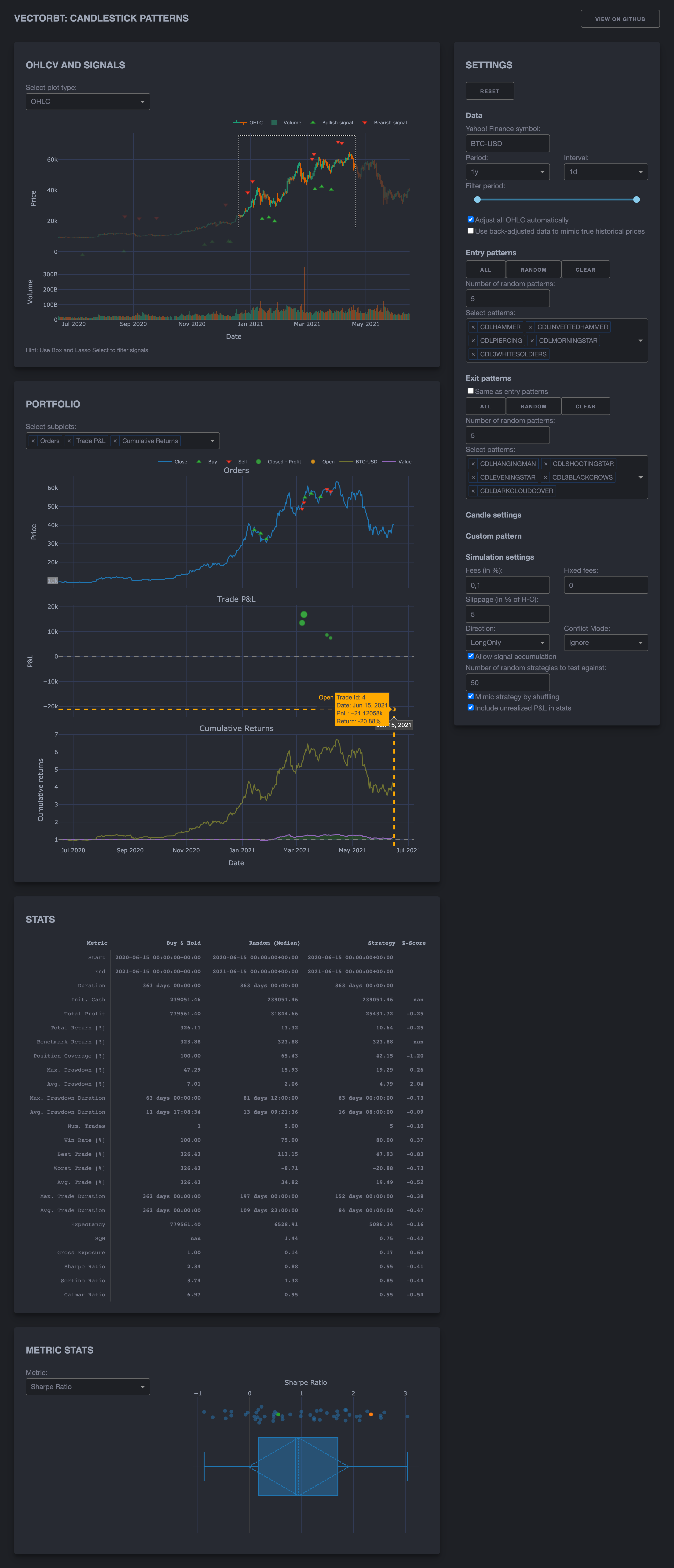
This app creates a dashboard using [Dash](https://github.com/plotly/dash) to visualize and backtest candlestick patterns.
|
|
|
|
* Supports [Yahoo! Finance](https://github.com/ranaroussi/yfinance) tickers
|
|
* Supports [TA-Lib](https://github.com/mrjbq7/ta-lib) candlestick patterns
|
|
* Allows to choose entry and exit patterns, and override candle settings
|
|
* Allows to specify signals manually
|
|
* Performs backtesting on selected signals using [vectorbt](https://github.com/polakowo/vectorbt)
|
|
* Visualizes OHLCV, signals, orders, trades and portfolio value using [Plotly](https://github.com/plotly/plotly.py)
|
|
* Displays key performance metrics such as Sharpe ratio
|
|
* Compares main strategy to holding and trading randomly
|
|
* Responsive design using [Dash Bootstrap Components](https://github.com/facultyai/dash-bootstrap-components)
|
|
|
|
## How to run the app
|
|
|
|
### Using Docker
|
|
|
|
Build the Docker image and run the container:
|
|
|
|
```bash
|
|
docker build -t candlestick-patterns .
|
|
docker run -p 8050:8050 -e HOST='0.0.0.0' candlestick-patterns
|
|
```
|
|
|
|
Visit [http://127.0.0.1:8050/](http://127.0.0.1:8050/)
|
|
|
|
Note: Compiling for the first time may take a while.
|
|
|
|
### Using virtual environment
|
|
|
|
To get started, first clone this repo:
|
|
|
|
```bash
|
|
git clone https://github.com/polakowo/vectorbt.git
|
|
cd vectorbt/apps/candlestick-patterns
|
|
```
|
|
|
|
Create and activate a conda env:
|
|
|
|
```bash
|
|
conda create -n candlestick-patterns python=3.7.6
|
|
conda activate candlestick-patterns
|
|
```
|
|
|
|
Or a venv (make sure your Python is 3.6+):
|
|
|
|
```bash
|
|
python3 -m venv venv
|
|
source venv/bin/activate # Unix
|
|
venv\Scripts\activate # Windows
|
|
```
|
|
|
|
Install the requirements:
|
|
|
|
```bash
|
|
pip install -r requirements.txt
|
|
```
|
|
|
|
In case of errors related to TA-Lib, see [Troubleshooting](https://github.com/mrjbq7/ta-lib#troubleshooting).
|
|
|
|
Run the app:
|
|
|
|
```bash
|
|
python app.py
|
|
```
|
|
|
|
Visit [http://127.0.0.1:8050/](http://127.0.0.1:8050/)
|
|
|
|
## Screenshot
|
|
|
|
|